
Redactionele opmerking: Deze post werd oorspronkelijk gepubliceerd op 6 juni 2025.
Wat is een locatie-allocatieprobleem in GIS?
De zomer is bijna hier, dus laten we beginnen met een zonnig voorbeeld. Stel je voor dat je de taak krijgt om de 1.000 meest winstgevende locaties in het Verenigd Koninkrijk te vinden om een ijskar te parkeren. Het gaat niet alleen om zoete lekkernijen, het is een geospatiaal locatie-allocatieprobleem, dat data en analyse gebruikt om de optimale plaatsbepaling te bepalen op basis van vraag, voetgangersverkeer en concurrentie.
Maar laten we eerlijk zijn: het gaat hier niet echt om ijscokarretjes.
In ons persoonlijke leven lossen we voortdurend dit soort problemen op, soms zonder dat we het ons realiseren.
Neem een simpel scenario: je plant een wekelijks etentje met je vijf beste vrienden, die elk in een ander deel van de stad wonen. Je wilt een restaurant kiezen dat de totale reistijd voor iedereen minimaliseert. Of denk groter: je zoekt een huis om te huren of te kopen. Je wilt een locatie die meerdere factoren balanceert: je woon-werkverkeer, de baan van je partner, de school van je kind, je sportschool en misschien zelfs je favoriete supermarkt.
Dit zijn locatie-allocatieproblemen, en ze zijn overal.
Overheden en bedrijven staan er dagelijks voor. Waar moeten we nieuwe brandweerkazernes plaatsen om 8 minuten reactietijd te garanderen in een stad? Wat is de beste plek voor een nieuwe afvalwaterzuiveringsinstallatie? Hoe selecteren we optimale locaties voor busdepots, oplaadstations voor elektrische voertuigen, of onderstations om congestie op het elektriciteitsnet te verminderen?
De lijst met toepassingen is eindeloos. En het proces stopt niet na het kiezen van de beste locaties. Je wilt vaak monitoren hoe deze locaties presteren in de loop van de tijd. Voldoen ze nog steeds goed aan de vraag? Is de bevolking verschoven? Welke inzichten kunnen we halen uit gebruiksgegevens, klantgedrag of operationele kosten?
Deze evolutie leidt van nature naar de wereld van dataproducten, big data, voorspellende modellering, en machinaal leren. Aangezien deze uitdagingen inherent ruimtelijk zijn, Geografische Informatiesystemen (GIS) onmisbaar blijven, niet alleen voor kaarten, maar als alomvattende informatiesystemen die integreren mensen, data, analyse, software en hardware. Om de kracht van GIS en ruimtelijke intelligentie echt te benutten, heb je een platform nodig dat al deze componenten naadloos en schaalbaar ondersteunt.
Er zijn veel tools beschikbaar om deze problemen op te lossen, maar in dit artikel wil ik me richten op Databricks en Apache Sedona, twee krachtige technologieën die ik heb gekozen om grootschalige locatie-allocatieproblemen aan te pakken. Ik zal uitleggen waarom deze tools zinvol zijn voor ruimtelijke big data-analyse en hoe ze passen in de moderne geospatiale stack.
Tijdens het lezen moedig ik je aan om na te denken over je eigen werk. Welke locatie-allocatieproblemen kom je tegen in jouw branche? Deel je gedachten in de reacties, ik hoor graag jouw perspectief.
Implementatie:
De volgende implementatie is onderdeel van de training die we aanbieden bij RevoData, specifiek gericht op het benutten van de geospatiale mogelijkheden van Databricks.
Als iemand die geïnteresseerd is in de ontwikkeling van data-producten, geef ik er de voorkeur aan dit te formuleren als een Agile user story, zoals hieronder weergegeven:
Als ijsbedrijf wil ik de beste locaties weten om 1000 ijscokarretjes te plaatsen in het VK, zodat ik de omzet en winst kan maximaliseren.
We willen weten hoeveel plekken we aan elke provincie kunnen toewijzen op basis van zijn oppervlakte.
· Op basis van onze BI-dashboards weten we dat parken de hoogste verkoop hebben. Dus, de locaties moeten zich nabij parkingangen bevinden.
Grotere parken met meer functionaliteiten (speeltuinen, sportvelden, enz.) zijn aantrekkelijker.
· Parkeerplaatsen die toegankelijker zijn, zijn wenselijker.
Nu, als data engineer of GIS-specialist die deze taak op zich neemt, zou ik het als volgt aanpakken:
Datasets:
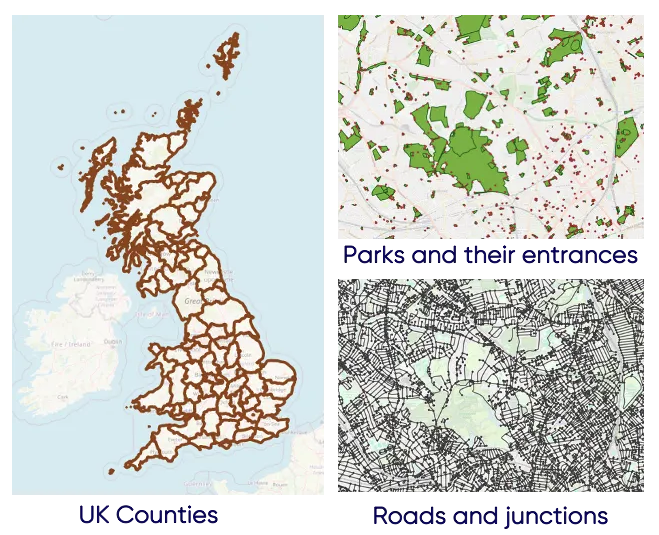
Eerst moet ik de relevante datasets verzamelen. Ik heb de volgende datasets van de UK Ordnance Survey gevonden:
Datapatroon:
Vervolgens wil ik, vanuit een conceptueel oogpunt, de Medallion Architectuur (of Multi-hop Architectuur) volgen. Dit houdt in dat de ruwe gegevens ongewijzigd worden ingevoerd (brons-tabellen), gefilterd, samengevoegd en verrijkt (zilver-tabellen), en vervolgens de top parken en parkingangen worden geproduceerd (goud-tabel).
Inname bronzen tafels
Met Apache Sedona is het inladen van gegevens vrij eenvoudig. In de onderstaande code ziet u hoe de GeoPackage bestanden worden gelezen uit een Azure storage account of een AWS S3 bucket:
					from sedona.spark import *
from sedona.maps.SedonaPyDeck import SedonaPyDeck
from sedona.maps.SedonaKepler import SedonaKepler
from pyspark.sql import functions as F
van sedona.sql import st_functions als st
van sedona.sql.types import GeometryType
van pyspark.sql.functions import expr


config = SedonaContext.builder() .\
    config('spark.jars.packages',
           'org.apache.sedona:sedona-spark-shaded-3.3_2.12:1.7.1,'
           'org.datasyslab:geotools-wrapper:1.7.1-28.5'). \
    getOrCreate()

sedona = SedonaContext.create(config)


catalog_name = "geospatial"
cloud_provider = "aws"

# Een woordenboek maken dat de naam van de schema's en tabellen specificeert op basis van de geopackage-lagen
schema_tables = {
    "lookups": {
        "bdline_gb.gpkg": ["boundary_line_ceremonial_counties"],
    },
    "greenspaces": {
        "opgrsp_gb.gpkg": ["greenspace_site", "access_point"]
    },
    "networks": {
        "oproad_gb.gpkg": ["road_link", "road_node"],
    },
}


# Elke geopackage-laag naar een Delta-tabel schrijven
voor schema, bestanden in schema_tables.items():
    voor gpkg_file, lagen in files.items():
        voor table_name in lagen:
            als cloud_provider == "azure":
                df = sedona.read.format("geopackage").option("tableName", table_name).load(f"abfss://{dataset_container_name}@{dataset_storage_account_name}.dfs.core.windows.net/{dataset_dir}/{gpkg_file}")
            elif cloud_provider == "aws":
                df = sedona.read.format("geopackage").option("tableName", table_name).load(f"s3://{dataset_bucket_name}/{dataset_input_dir}/{gpkg_file}")
            df.write.mode("overwrite").saveAsTable(f"{catalog_name}.{schema}.{table_name}")
            print(f"Tabel {catalog_name}.{schema}.{table_name} is aangemaakt, hoera!")
Verkennen en visualiseren:
Nu we de GeoPackage bestanden hebben getransformeerd naar Delta tabellen met een geometry kolom, is het eenvoudig en inzichtelijk om de data te verkennen en business requirements te vertalen naar zinvolle code:
					%sql
SELECT DISTINCT
FROM geospatial.greenspaces.greenspace_site
ORDER BY;
					# Een Delta-tabel inlezen in een Spark-dataframe
access_point_df  = spark.sql("""
  SELECT fid, access_type, geometry
  FROM geospatial.greenspaces.access_point
  WHERE access_type = 'Pedestrian'
""").limit(500)

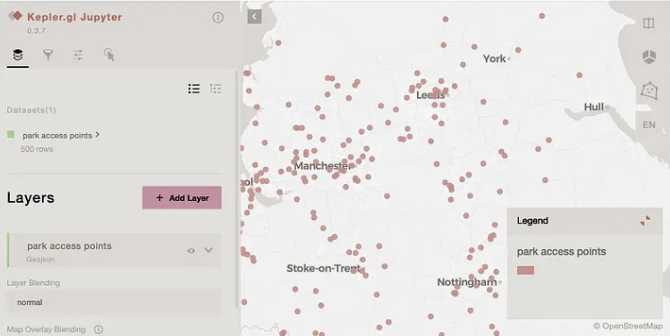
# 500 toegangspunten op de kaart visualiseren met SedonaKepler
map = SedonaKepler.create_map()
SedonaKepler.add_df(map, access_point_df, name="park access points")
map
Verrijk zilveren tafels:
Nu de GeoPackage-bestanden in Delta-formaat zijn, passen we een paar verrijkingen toe op elke tabel:
1. Met behulp van de Britse administratieve grenzen verdelen we de 1000 ijsverkoopwagens op basis van de oppervlakte van elke regio, zodat grotere gebieden meer wagens krijgen.
					# Administratieve grenzen uitlezen en de oppervlakte berekenen
administrative_boundaries  = spark.sql("""
  SELECT b.fid, b.name, ST_Area(b.geometry) AS area, geometry, ST_Geohash(ST_Transform(geometry,'epsg:27700','epsg:4326'), 5) AS geohash
  FROM geospatial.lookups.boundary_line_ceremonial_counties b
""").repartitionByRange(2, "geohash")

total_locations = 1000
uk_area = administrative_boundaries.selectExpr("SUM(area) AS total_area").first().total_area

# Berekenen hoeveel ijskarren er in elk land kunnen worden geplaatst op basis van de oppervlakte
administrative_boundaries = administrative_boundaries.withColumn(
    "number_of_locations",
    F.round(F.col("area") / uk_arae * F.lit(total_locations)).cast("integer")
).orderBy("number_of_locations", ascending=True)

administrative_boundaries.write.mode("overwrite").option("mergeSchema", "true").saveAsTable(f"geospatial.lookups.boundary_line_ceremonial_counties_silver")
administrative_boundaries.createOrReplaceTempView("administrative_boundaries_vw")
2. De groengebiedentabel bevat parken, begraafplaatsen, kerkhoven, etc. We richten ons op parken. Hoewel parken speeltuinen en andere voorzieningen kunnen bevatten, zijn we niet geïnteresseerd in de geometrieën van die kleinere gebieden en is de grotere parkgeometrie voldoende. We categoriseren parken ook op grootte met behulp van oppervlaktekwantielen. Tot slot zijn we ook geïnteresseerd om te weten tot welk graafschap elk park behoort.
					# Reading the greenspace_site table and filtering relevant objects
df_greenspaces_bronze = spark.table("geospatial.greenspaces.greenspace_site") \
    .filter("function IN ('Play Space', 'Playing Field', 'Public Park Or Garden')")
df_greenspaces_bronze.createOrReplaceTempView("greenspace_site_bronze_vw")

# Finding the small playgrounds inside larger parks
greenspace_site_covered = spark.sql("""
  SELECT
    g1.id AS g1_id,
    g2.id AS g2_id,
    g1.function AS g1_function,
    g2.function AS g2_function,
    g2.distinctive_name_1 AS g2_name,
    g2.geometry AS geometry,
    ST_Geohash(ST_Transform(g2.geometry ,'epsg:27700','epsg:4326'), 5) AS geohash
  FROM greenspace_site_bronze_vw g1
  INNER JOIN greenspace_site_bronze_vw g2
    ON ST_CoveredBy(g1.geometry, g2.geometry)
   AND g1.id != g2.id
""").repartitionByRange(10, "geohash")

greenspace_site_covered.createOrReplaceTempView("greenspace_site_covered_vw")

# Aggrgating the small playgrounds in the larger parks
greenspace_site_aggregated = spark.sql("""
  SELECT
    g2_id AS id,
    concat_ws(', ', any_value(g2_function), collect_set(g1_function)) AS functions,
    count(*) + 1 AS num_functions,
    g2_name AS name,
    ST_Area(geometry) AS area,
    geometry,
    ST_Geohash(ST_Transform(geometry,'epsg:27700','epsg:4326'), 5) AS geohash
  FROM greenspace_site_covered_vw
  GROUP BY g2_id, g2_name, geometry
""").repartitionByRange(10, "geohash")
greenspace_site_aggregated.createOrReplaceTempView("greenspace_site_aggregated_vw")

# Find the parks without any smaller playgrounds inside them
greenspace_site_non_covered = spark.sql("""
  SELECT id, function, 1 AS num_functions, distinctive_name_1 AS name, ST_Area(geometry) AS area, geometry,
  ST_Geohash(ST_Transform(geometry,'epsg:27700','epsg:4326'), 5) AS geohash
  FROM greenspace_site_bronze_vw
  WHERE id NOT IN (SELECT g1_id FROM greenspace_site_covered_vw)
    AND id NOT IN (SELECT g2_id FROM greenspace_site_covered_vw)
""").repartitionByRange(10, "geohash")
greenspace_site_non_covered.createOrReplaceTempView("greenspace_site_non_covered_vw")

# Union the above two dataframes
greenspace_site_all = spark.sql("""
SELECT * FROM greenspace_site_aggregated_vw
UNION
SELECT * FROM greenspace_site_non_covered_vw""").repartitionByRange(10, "geohash")

# Calculate 0%, 20%, 40%, 60%, 80%, 100% quantiles
quantiles = greenspace_site_all.approxQuantile("area", [0.0, 0.2, 0.4, 0.6, 0.8, 1.0], 0.001)
print("Quintile breakpoints:", quantiles)

q0, q20, q40, q60, q80, q100 = quantiles


# Categorize each park based on its area
greenspace_site_all = greenspace_site_all.withColumn(
    "area_category",
    F.when(F.col("area") <= q20, 20)
     .when(F.col("area") <= q40, 40)
     .when(F.col("area") <= q60, 60)
     .when(F.col("area") <= q80, 80)
     .otherwise(100)
)

display(greenspace_site_all.groupBy("area_category").count().orderBy("area_category"))
greenspace_site_all.createOrReplaceTempView("greenspace_site_all_vw")

# In the final step, we aim to identify the county each park falls within.
greenspace_site_silver = spark.sql("""
WITH tmp AS (
  SELECT a.id, a.functions, a.num_functions, a.name, a.area, a.area_category, a.geometry, a.geohash,
  RANK() OVER(PARTITION BY a.id ORDER BY ST_Area(ST_Intersection(a.geometry, b.geometry)) DESC) AS administrative_rank,
  b.fid as administrative_fid
  FROM greenspace_site_all_vw a
  INNER JOIN administrative_boundaries_vw b
  ON ST_Intersects(a.geometry, b.geometry)
)
SELECT tmp.id, tmp.functions, tmp.num_functions, tmp.name, tmp.area, tmp.area_category, tmp.administrative_fid, tmp.geometry, tmp.geohash
FROM tmp
WHERE  administrative_rank = 1
""").repartitionByRange(10, "geohash")

greenspace_site_silver.createOrReplaceTempView("greenspace_site_silver_vw")

# Write the dataframe into the correspoding silver Delta Table
greenspace_site_silver.write.mode("overwrite").option("mergeSchema", "true").saveAsTable(f"geospatial.greenspaces.greenspace_site_silver")
3. Voor elke wegknoop (d.w.z. straatkruispunt) berekenen we het aantal verbonden zijden (straten) (d.w.z. de graad van de knoop). Hoe meer verbindingen, hoe prominenter het kruispunt.
					# Bereken de graad van elk wegknooppunt op basis van de randen waarmee het verbonden is
road_nodes_silver = spark.sql("""
SELECT a.fid, a.id, a.form_of_road_node, COUNT(DISTINCT b.id) AS degree, a.geometry, ST_Geohash(ST_Transform(a.geometry,'epsg:27700','epsg:4326'), 5) AS geohash
FROM geospatial.networks.road_node a
JOIN geospatial.networks.road_link b
ON a.id = b.start_node
OR a.id = b.end_node
GROUP BY a.fid, a.id, a.form_of_road_node, a.geometry
ORDER BY COUNT(DISTINCT b.id) DESC""").repartitionByRange(10, "geohash")

# Schrijf naar een Delta-tabel
road_nodes_silver.write.mode("overwrite").saveAsTable(f"geospatial.networks.road_node_silver")
4. Voor parkingangen richten we ons op voetgangersingangen, omdat deze meer voetverkeer aantrekken, ideaal voor ijscokarren. We houden ook rekening met de knooppuntgraad van de dichtstbijzijnde straat kruising bij elke ingang, omdat dit aangeeft hoe goed verbonden en toegankelijk de ingang is.
					# Zoek relevante ingangen van parken
greenspace_entries = spark.sql("""
SELECT a.fid, a.id, a.access_type, a.ref_to_greenspace_site, a.geometry, ST_Geohash(ST_Transform(a.geometry,'epsg:27700','epsg:4326'), 5) AS geohash
FROM geospatial.greenspaces.access_point a
WHERE a.ref_to_greenspace_site IN (SELECT id FROM greenspace_site_silver_vw) AND a.access_type IN ('Pedestrian', 'Motor Vehicle And Pedestrian')""").repartitionByRange(10, "geohash")

greenspace_entries.createOrReplaceTempView("greenspace_entries_vw")

# Zoek het dichtstbijzijnde wegkruispunt
entry_road_1nn = spark.sql("""
SELECT
    a.fid,
    a.id,
    a.access_type,
    a.ref_to_greenspace_site,
    b.fid AS nearest_road_node_fid,
    ST_Distance(a.geometry, b.geometry) AS distance_to_road_node,
    a.geometry,
    a.geohash
FROM greenspace_entries_vw a
INNER JOIN geospatial.networks.road_node_silver b
ON ST_kNN(a.geometry, b.geometry, 1, FALSE)""").repartitionByRange(10, "geohash")

# Schrijf naar een Delta-tabel
entry_road_1nn.write.mode("overwrite").saveAsTable(f"geospatial.greenspaces.access_point_silver")
Geaggregeerde gouden tabellen:
Nu we onze zilveren tabellen hebben verrijkt, kunnen we elk park en elke ingang rangschikken op basis van de gedefinieerde criteria en onze top 1000 locaties selecteren.
					%sql
-- Top parken om de ijskarren te plaatsen
CREATE OR REPLACE TABLE geospatial.greenspaces.top_parks_gold AS (
  WITH tmp AS (
    SELECT
    gs.id,
    gs.name AS park_name,
    gs.functions,
    gs.num_functions,
    gs.area_category,
    sum(rn.degree) AS accessibility_degree,
    cc.name AS county,
    cc.number_of_locations,
    row_number() OVER (PARTITION BY cc.name ORDER BY gs.area_category DESC, gs.num_functions DESC, sum(degree) DESC) AS park_rank,
    ST_AsEWKB(gs.geometry) AS geometry
    FROM geospatial.greenspaces.greenspace_site_silver gs
    LEFT JOIN geospatial.greenspaces.access_point_silver ga
    ON gs.id = ga.ref_to_greenspace_site
    LEFT JOIN geospatial.networks.road_node_silver rn
    ON ga.nearest_road_node_fid = rn.fid
    LEFT JOIN geospatial.lookups.boundary_line_ceremonial_counties_silver cc
    ON gs.administrative_fid = cc.fid
    GROUP BY gs.name, gs.functions, gs.num_functions, gs.area_category, cc.number_of_locations, cc.name, gs.geometry, gs.id, cc.name)
  SELECT * FROM tmp WHERE park_rank <= number_of_locations);
					%sql
-- Belangrijkste toegangen om de ijskarren te lokaliseren
CREATE OR REPLACE TABLE geospatial.greenspaces.top_entrances_gold AS (
  WITH A AS (
    SELECT
    ga.id,
    ga.ref_to_greenspace_site AS park_id,
    gs.park_rank,
    ga.access_type,
    rn.degree,
    ga.distance_to_road_node,
    row_number() OVER (PARTITION BY gs.id ORDER BY rn.degree DESC, ga.distance_to_road_node ASC) AS entry_rank,
    ST_AsEWKB(ga.geometry) AS geometry,
    ST_X(ST_Transform(ga.geometry,'epsg:27700','epsg:4326')) AS longitude,
    ST_Y(ST_Transform(ga.geometry,'epsg:27700','epsg:4326')) AS latitude
    FROM geospatial.greenspaces.top_parks_gold gs
    LEFT JOIN geospatial.greenspaces.access_point_silver ga
    ON gs.id = ga.ref_to_greenspace_site
    LEFT JOIN geospatial.networks.road_node_silver rn
    ON ga.nearest_road_node_fid = rn.fid
  )
  SELECT * FROM A WHERE entry_rank = 1
);
Wat is hierna?
In onze live training “Databricks Geospatial in een dag” bij RevoData Kantoor, zullen we dieper ingaan op de logica achter deze code en dit voorbeeld gebruiken om te demonstreren hoe u:
· Centre opzetten met alle benodigde geospatiale bibliotheken
· Volg de best practices voor het werken met Unity Catalog
· Organiseer data met behulp van de Medallion Architectuur
· Bouw een orchestratieworkflow
Creëer een AI/BI-dashboard om de topingangen te visualiseren

Melika Sajadian
Senior Geospatial Consultant bij RevoData, die haar kennis over Databricks Geospatial met u deelt